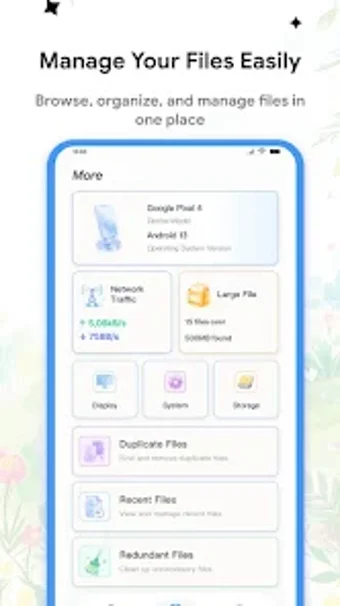
All-in-one Android maintenance: files, data, and app scans
Manage files, monitor mobile and WiFi usage, and scan installed apps from a single dashboard: CleanDuck combines File Management, Data Usage Tracking, and Security Scanning. Bikeere Group’s Android utility bundles a categorized Storage Overview and a simplified dashboard into a roughly 30 MB installer. The app targets Android users who want one compact tool to organise media, keep an eye on data consumption, and run basic security checks without multiple installs.
What core tasks does the app perform?
CleanDuck groups three maintenance tasks under one interface: browsing and organising photos, videos, audio, and documents through the File Management module; viewing a categorized Storage Overview to see which content types occupy space; and reporting real-time mobile and WiFi data usage via the Data Usage Tracking feature. In addition, the Security Scanning function inspects apps and files and presents detected items for review.
How much system impact and footprint should you expect during use?
The installer size is about 30 MB, which keeps initial storage demands modest. While the source does not list live CPU or RAM figures, the app’s small installation suggests a lightweight footprint during idle use. Data Usage Tracking operates continuously to show real-time figures, so expect background network monitoring to run while the app tracks mobile and WiFi traffic.
Is the app safe to run on a regular device?
Security Scanning inspects installed apps and files and surfaces potential risks, and the interface lets users review detected items before taking action. The scan operates as a reporting tool rather than an automatic remediation engine, which reduces the chance of unintentional removal. Permission requirements are consistent with Android utilities that access storage and network statistics.
Do non-technical users need specialist knowledge to operate it?
The dashboard is described as simplified for quick access to tools, and File Management exposes common media categories rather than raw directories, which lowers the learning curve. Users who prefer manual control can still browse individual files, while those who need only overview metrics can rely on the Storage Overview and Data Usage panels without deep technical steps.
Useful single-app maintenance for everyday Android users, with a limited security scope
The app suits Android users who prefer a compact tool that combines file browsing, storage visibility, and live data monitoring in a single place. Its small installer and category-based file view match that audience. The main caveat is that the security scanner reports potential risks but does not describe automated protection layers, so rely on it for detection and then use specialised tools for remediation if needed.